Taskbase — Agent World: the Town and the Building¶
Kind: reference
The Agent world shows an organization's agents at work, live, in two places:
- The town, on the Organizations page: one building per organization. Yours are named, lit while agents work there, and open that organization's World. Every other organization is an anonymous, closed building.
- The building, on an organization's World tab: its inside, with a room per project, a lounge, a meeting room and a review desk. Each consultant (a persona on a runner) is drawn where their work puts them, with a bubble that says what they are doing.
Both pages draw the same state twice: once as a pixel-art scene in SVG and once as a text list. Nothing on them changes anything.
Agent world v2 is epic #63, built in tasks #1113 and #1126 (the town), #1116 (the town API),
1117 (floor plan), #1120 (places and bubbles), #1121 (walking), #1114, #1127, #1128 and #1145¶
(the interior) and #1148 (projects and personas on every poll), with the art from #1112 and #1122–#1125. Version 1 is decision #1100, tasks #1105–#1107. The analysis behind it is
docs/agent-world-visualization.md
in Skatzi/taskbase.
Sources, read on 2026-10-18 from Skatzi/taskbase main (12a87d3, after PR #504; the polling
of projects and personas re-read at 593f3d9, after PR #506):
api/internal/organization/town.go and store_pg.go (the town API), api/internal/authz/guard.go,
ui/src/Town.jsx and townLayout.js (the town), ui/src/World.jsx and agentWorld.js (the
state and the text list), agentWorldFloor.js (floor plan), agentWorldPlaces.js (places and
bubbles), agentWorldWalk.js (walking), WorldInterior.jsx and worldArt.jsx (the scene), the
.world* and .town* rules in ui/src/app.css, and their tests.
Where it is¶
| The town | The building | |
|---|---|---|
| Page | Organizations page, Town view | An organization's World tab, the last tab |
| Route | / (the toggle List / Town) |
/organizations/{orgId}/world |
| Who | Anyone signed in | Anyone who can reach the organization |
| Code | Town.jsx, loaded lazily |
World.jsx and WorldInterior.jsx, loaded lazily |
The Organizations page remembers the chosen view in the browser's localStorage under
organizations.view. The default is List.
The town¶
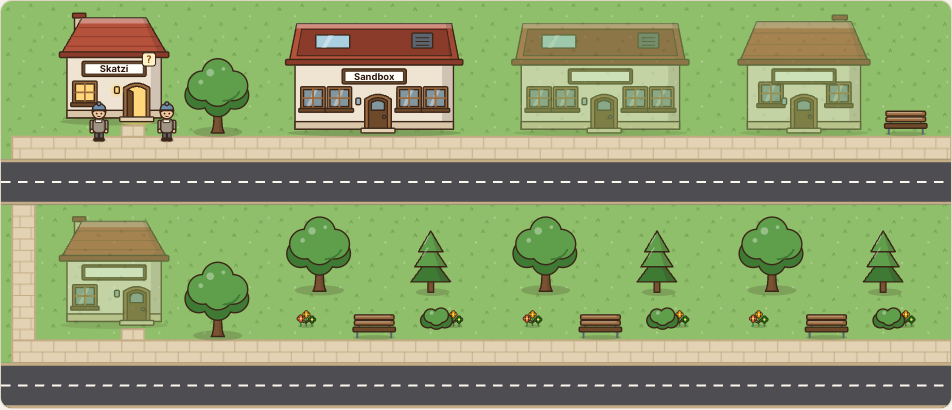
The town with two of your organizations and three others. Captured from the merged UI with a mocked town response, so the names and counts are made up.
Buildings¶
| What you see | Means |
|---|---|
| A building with a name on its sign | One of your organizations. It is a link to its World tab |
| Lit windows, open lit door | At least one active run there |
| Dark windows, shut door | No active run there. The text list says "quiet" |
| Up to 3 consultants at the door | Distinct personas on those runs, capped at 3. They bob gently |
| ? on the sign | At least one task there has an open Needs attention item |
| A building with a blank sign, always dark | Another organization. See Other organizations |
"Active" is counted by the API, not the browser
(api/internal/organization/store_pg.go, Activity):
- Active runs: unfinished task runs at the organization's projects whose runner was seen in the last 3 minutes (the runners' online window).
- Consultants working: the distinct personas on those runs (the role when a run has none).
- Needs attention: tasks with an open Needs attention item.
The UI shows consultants and lit windows only while there is an active run, so a building with only a Needs attention item is dark with a "?".
Layout¶
Your organizations come first, in id order, then the anonymous buildings. There are four plots
to a street, and streets are added below as needed; empty plots of the last street become a
park. A building keeps its plot and style while the organizations before it stay, so it is in
the same place on every visit (townLayout.js).
Text list¶
Under the map, Your organizations lists each one as a link with its activity, for example "Skatzi · 3 active runs, 2 consultants working, 2 items need attention", or "quiet". Then a line "3 other organizations" when there are any. With no organization at all it reads "You do not have access to any organization yet."
Other organizations¶
The town API returns only the number of organizations the caller cannot reach: no id, name
or activity. They are drawn as closed buildings with a blank sign, hidden from screen readers,
and not links. They never light up. See
GET /api/organizations/town.
The building¶
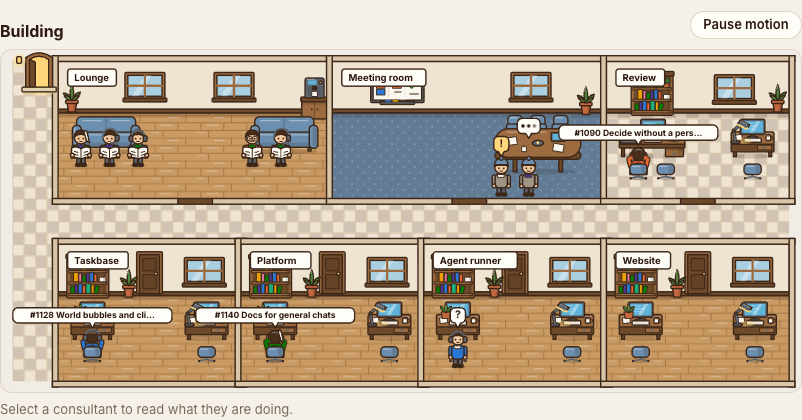
The World tab's scene with four projects (from PR #504, ui/screenshots/world-interior-light.png).
Floor plan¶
| Place | What it is |
|---|---|
| Entrance | The open door at the top left. Consultants arriving walk in from here, and leaving walk out |
| Lounge | Sofas and a coffee machine. Idle and sleeping consultants |
| Meeting room | A table and a whiteboard. Decisions and chats |
| Review | The review desk. Review runs |
| Project rooms | One per project, labelled with its name (cut to 18 characters; the full name is in its tooltip). Two desks each |
| Halls and spine | The corridors consultants walk along |
The lounge, meeting room and review desk are the top row. Project rooms follow in project id
order: four in the first row, then bands of eight below. A new project takes the next slot, so
adding a project never moves an existing room; the building grows downwards and the scene scrolls
(agentWorldFloor.js).
The plan follows the project list, which the World re-reads every 10 s (World.jsx, since #1148):
- A project created while the World is open gets its room on the next poll, within about 10 s, without a reload. A renamed project relabels its room.
- A deleted project's room disappears. Anyone still placed there (a run or a Needs attention item
on it) rests in the lounge (
worldPeople'sroomsinagentWorldPlaces.js). Because rooms are in project id order, deleting a project can move the rooms after it; only adding is sure not to. - An unchanged list keeps the plan as it is, so nothing flickers. A failed refresh keeps the last list.
Who is where¶
Each person in the building is a consultant: a persona, wearing the badge colour of its
runner. Where they are and what their bubble says comes from worldPeople in
agentWorldPlaces.js:
| State | When | Place | Pose | Bubble |
|---|---|---|---|---|
| Working | An implementation run whose runner is online | Its project's room, at a desk | Typing | #id title, cut to 28 characters |
| Reviewing | A review run whose runner is online | The review desk | Typing | #id title |
| Waiting | An open Needs attention item about a task, other than a decision | That task's project room | Standing | ?, a link to the item |
| Deciding | An open item asking a person for a decision | The meeting room | Standing | !, a link to the item |
| Chatting | A chat turn running on a runner that serves only this organization | The meeting room | Standing | Three animated dots |
| Idle | A crew member with no run, on an online runner that is not held | The lounge | Reading | none |
| Sleeping | A crew member of a runner whose subscriptions are all held | The lounge | Asleep | z |
| Absent | A stalled run (its runner offline), or the crew of an offline runner | Not drawn | ||
| Elsewhere | A shared runner busy with another organization's work | Not drawn |
- The crew of every runner shown is the organization's active task personas, so a runner with seven personas puts seven consultants in the building. Session personas are never crew.
- A crew member with a run here is drawn once, at the run, not also in the lounge.
- A waiting or deciding consultant is the agent the task is assigned to, or a generic consultant when a person holds it.
- Seats fill from the lowest free one, and a consultant keeps their seat between polls while they stay in the same room. When a room's seats run out, the rest stand in its overflow spots.
Walking¶
When a poll moves a consultant, they walk there along the corridors: out of their room's door,
along the hall and the spine, and in through the new door. They walk 4 tiles a second, faster
when needed to arrive before the next poll. A consultant who appears walks in from the entrance;
one whose work ended walks out to it. A consultant who finishes a run walks back to the lounge
(agentWorldWalk.js, WorldInterior.jsx).
Selecting a consultant¶
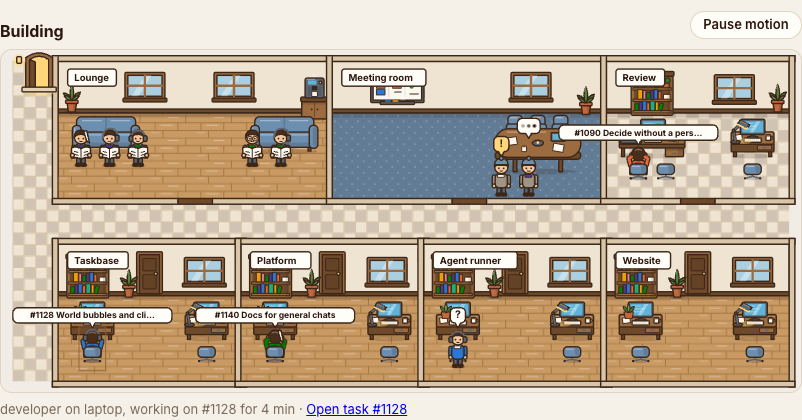
A selected consultant (from PR #504, ui/screenshots/world-interior-selected.png).
Every consultant is a button named after what they show. The runner is named when the consultant has one; a waiting or deciding consultant has none. Selecting one (click, tap, Enter or Space) puts the name in the caption under the scene, with a link:
| State | Caption | Link |
|---|---|---|
| Working | "developer on laptop, working on #123 for 4 min" | Open task #123 (its dialog on the project board) |
| Reviewing | "reviewer on laptop, reviewing #123, round 2, for 11 min" | Open task #123 |
| Waiting | "developer, waiting at #123, which needs attention" | Open the item for #123 (/attention/{id}) |
| Deciding | "consultant, waiting for a decision on #123" | Open the item for #123 |
| Chatting | "analyst on laptop, chatting with a person" | none |
| Sleeping / idle | "developer on laptop, asleep" / "…, resting" | none |
With nothing selected the caption reads "Select a consultant to read what they are doing." The ? and ! bubbles are links to the item themselves.
Text list¶
Beside the scene, or above it below 768 px, the text list holds everything the scene draws, as text and links:
- Projects: one entry per project, with its runs ("developer working on #123 title · 4 min", "reviewer reviewing #123 title · round 2 · 11 min", "developer stalled on #123 title · 4 min · runner laptop offline") and its items ("Decision needed: #123 title", "Needs attention: #123 title · reason"). Task numbers link to the task, items to the item. A project with neither reads Quiet.
- Runners: each runner shown, with its state, its slots and its crew. With none: "No runner serves this organization."
| Runner state | When |
|---|---|
| open | Online, not paused or draining |
| closed (offline), closed (paused), closed (draining) | Offline, or desired_state is paused or draining |
| asleep until time | Every subscription it reports is held (limits[].limited_until in the future); the time is the earliest that lifts, in local time |
Slots read "Slots: 1 busy here, 1 busy elsewhere, 2 free". "Busy" is the sum of the runner's
runs_in_progress; "here" is this organization's active runs on it; the rest is "elsewhere".
Crew read "Developer (working on #123), Reviewer (idle), …", with states working, stalled,
asleep or idle.
Motion, pause and accessibility¶
- Pause motion stops all motion on both pages; the button then reads Play motion. The
town and the building share one setting, kept in
localStorageunderworld.paused. - With the system's reduced-motion setting (
prefers-reduced-motion: reduce), nothing animates: consultants are at their place at once, without walking, and typing, bobbing and bubble dots stand still. - While the page is hidden nothing is polled, and in the building everyone is put at their place without walking. Both pages load again as soon as the page is visible.
- The text list is the full alternative on both pages, and comes first on a narrow screen in the building.
- Town buildings of your organizations are links named, for example, "Skatzi: 3 active runs, 2 consultants working, 2 items need attention. Open its World". In the building, rooms are named ("Project room: Platform", "Lounge", "Meeting room", "Review desk", "Entrance"), consultants are buttons, and ? / ! bubbles are links named "Needs attention: #123" or "Decision needed: #123".
- The art is drawn in code in the theme's tokens, so it follows every UI theme, light and dark.
The seven built-in task personas (
junior-developer,developer,senior-developer,reviewer,analyst,technical-writer,project-manager) each have their own outfit and accessory; any other persona is a generic consultant. Runner badges use the same palette in reverse; runners after the seventh share the neutral colour (worldArt.jsx,WorldInterior.jsx).
Where the data comes from¶
flowchart LR
  town[GET organizations town, every 10 s] --> map[Town map and list]
  poll[Projects, personas, runners, active runs, attention, every 10 s] --> state[worldState and worldPeople]
  state --> list[Text list]
  state --> scene[Building scene]
Both pages poll every 10 seconds while visible. The building derives everything in the browser; the scene and the text list draw the same derived state, so they always agree:
| Route | Read | Used for |
|---|---|---|
GET /api/organizations/town |
Town, every 10 s | Buildings and their activity |
GET /api/organizations/{orgId}/projects |
Building, every 10 s | Project rooms |
GET /api/organizations/{orgId}/agent-types |
Building, every 10 s | The crew |
GET /api/runners |
Building, every 10 s | Runners, slots, online, paused, draining, holds, chat turns |
GET /api/organizations/{orgId}/runs?active=true |
Building, every 10 s | Working, reviewing and stalled consultants |
GET /api/attention |
Building, every 10 s | Waiting and deciding consultants |
When a poll fails, the page shows "Could not load the town: …" or "Could not load live state: …"
above the last state it read. A failed read of projects and personas shows nothing and keeps the
last list; only when the first one fails does the World tab show "Could not load the organization: …"
instead of the building (World.jsx).
GET /api/organizations/town¶
{
  "organizations": [
    { "id": 1, "name": "Skatzi",
      "activity": { "active_runs": 3, "consultants_working": 2, "needs_attention": 2 } }
  ],
  "others": 3
}
| Field | Meaning |
|---|---|
organizations[] |
The organizations the caller reaches: every one for administrators and service keys, those of their grants for people, only the run's or turn's for agents |
organizations[].activity |
active_runs, consultants_working, needs_attention, as in Buildings. Zero when nothing happens |
others |
How many other organizations exist. Nothing else about them is returned |
Open to agents (agentReadable in authz/guard.go). Documented in the API's OpenAPI spec as
getOrganizationTown. The example above is the shape from town.go, not a captured response.
Access rules¶
The Agent world shows nothing a person could not already see, and never suggests that another
organization's work happens here. agentWorld.js and the town API apply these rules:
- Only runners that serve this organization are drawn. An instance runner, or one whose
scope lists the organization.
GET /api/runnersalso returns runners the person sees because they serve another of the person's organizations; those are left out. - Runs come only from the organization's own route,
GET /api/organizations/{orgId}/runs?active=true, which the API guards per organization. - Other organizations' work is "elsewhere". A shared runner's slots busy with work not in this organization's runs are counted as "busy elsewhere" in the text list, with no persona, task or duration, and are not drawn in the building.
- Chats show only on a runner that serves this organization alone. Chat turns carry no organization, so a turn on a shared or instance runner counts as elsewhere.
- Other organizations in the town are a count. The API returns no id, name or activity for them.
- A run works only while its runner is online. A run stays active until its lease lapses, even after its runner stops sending heartbeats; until then it is stalled, and its consultant is absent.
Runners offline for more than 24 hours (the API's RecentlySeenWindow), or never seen, are
hidden.
Not built¶
From the analysis's §6 Effort and phases and its deferrals:
| Not done | Today | Would come with |
|---|---|---|
| Carrying a PR to the reviewer, a celebration on merge | Not shown. Polling cannot tell exactly when these happen | An activity route (GET /api/organizations/{orgId}/activity?since=), which does not exist yet |
| Chats on shared runners | Counted as elsewhere, not drawn | When session turns carry their organization |
| Activity poses ("testing", …) | Typing only | When runs report progress |
| Idle wandering | Idle consultants read in the lounge | Not in epic #63; no task yet |
| The queue, sounds, a canvas renderer | Not shown | Later, when asked for |
Further reading¶
- Runners and Runs: runner scope, slots, holds, pause and drain
- Attention: the Needs attention items behind the ? and !
- Agent Sessions: the chats in the meeting room
- Authentication: grants and what agents may read